

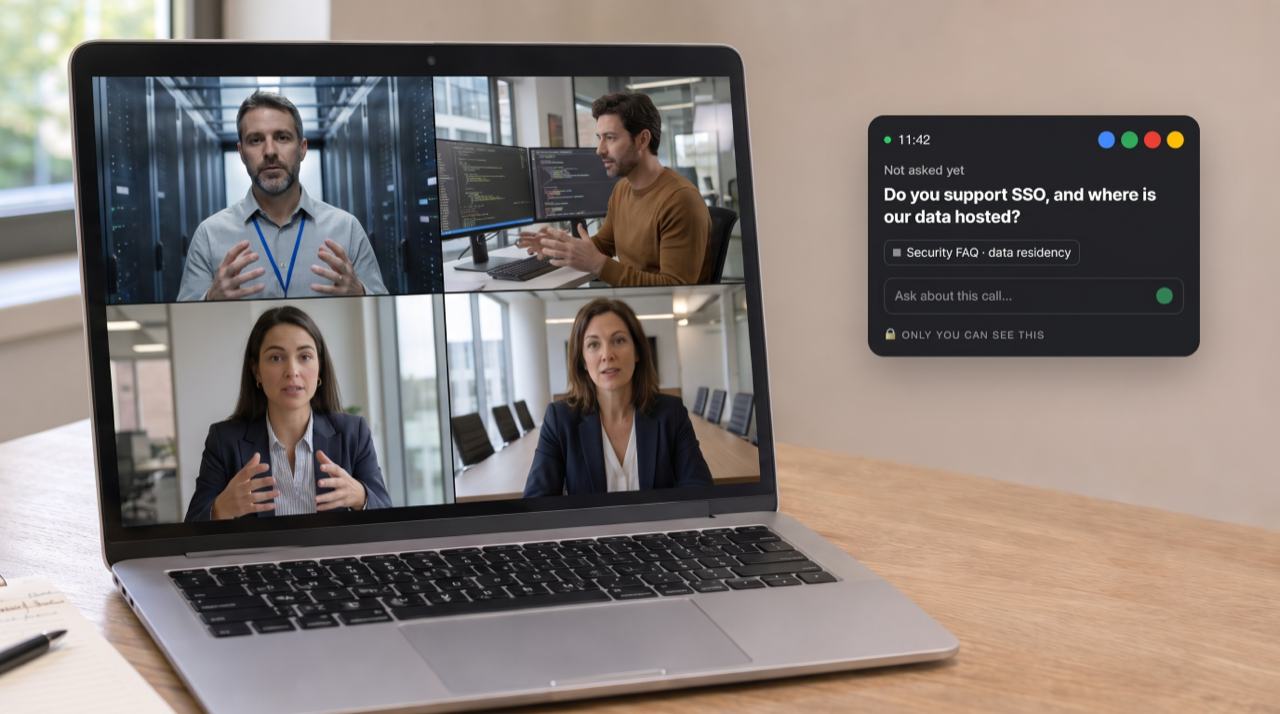
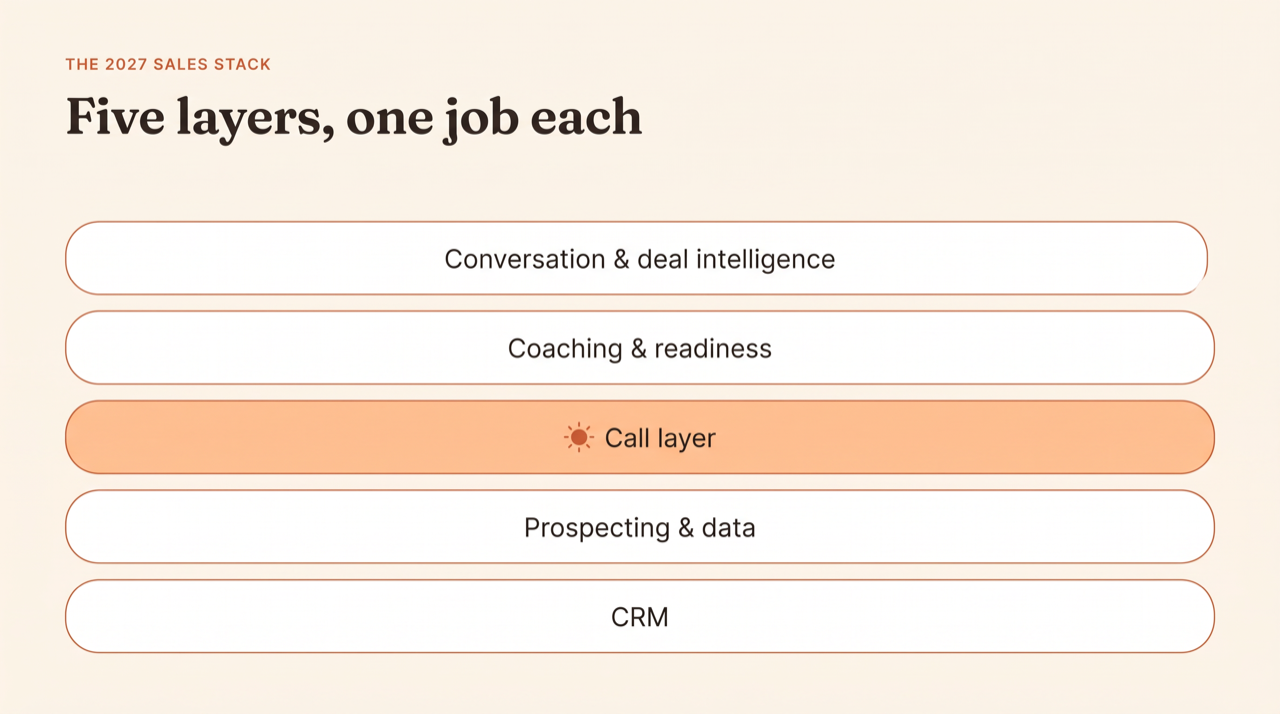
There is no single "best" AI sales tool, because the tools do different jobs. A contact database, a call assistant and a forecasting platform don't compete with each other; they sit in different layers of your sales stack. This guide covers the AI sales tools a B2B team should consider for 2027, grouped by the job they do, so you can see what you have, what is missing, and what fits your team size.
For teams that sell technical products, the layer that matters most is the call itself: the moment a buyer asks a hard question. That is the layer Sunnyside AI is built for, and the one this guide covers in the most depth.
Disclosure: we build Sunnyside AI. We have tried to describe every tool, including ours, accurately and with its limits, and we link to a source for each fact and price.
Key Takeaways
- Think in layers, not rankings. Most B2B teams need a CRM, a prospecting tool, a call tool and, as they grow, coaching and conversation and deal intelligence.
- Sunnyside AI covers three layers in one tool: calls (prep, live answers, follow-up), coaching (AI roleplay) and conversation and deal intelligence.
- The call layer is where technical deals are won or lost. Sunnyside AI, Fireflies Live Assist and Clari Copilot all now help reps during live calls; they differ in focus and price.
- Start small. A founder-led team can run on a CRM, Apollo and a call tool like Sunnyside, and add the rest as the team grows.
- Test the call layer before you buy. Run the 10-question test below in any free trial.
Why You Need a Stack, Not a Single Tool
Reps are short on selling time. In Salesforce's sixth State of Sales report (2024), reps said non-selling work such as admin and meeting prep takes up 70% of their time (source: Salesforce State of Sales, 6th edition). AI can give that time back, but only if each part of the sales process is covered: finding buyers, talking to them, coaching reps and forecasting the pipeline. No single tool does all of that well, so the smart move is to pick one strong tool per layer and make sure they connect to your CRM.
The AI Sales Tech Stack for 2027 at a Glance
| Layer | What it does | Tools to consider | Starting price |
|---|---|---|---|
| CRM with built-in AI | System of record; AI drafting and summaries | HubSpot Sales Hub (Breeze AI) | Free; AI included in Sales Hub |
| Prospecting and data | Find, enrich and contact buyers | Apollo.io, Clay | Free plans; paid from $49/seat (Apollo), $167/mo (Clay) |
| Call layer | Prep, live help during calls, follow-up | Sunnyside AI, Fireflies Live Assist, Clari Copilot | From $19/mo (Sunnyside), $10/seat (Fireflies), quote (Clari) |
| Coaching and readiness | Practice, roleplay and training | Sunnyside AI roleplay, Mindtickle | Included in Sunnyside; quote (Mindtickle) |
| Conversation and deal intelligence | Call analytics, deal insights and forecasts | Sunnyside AI, Gong, Clari Forecast (Salesloft) | Included in Sunnyside plans; quote (Gong, Clari) |
1. CRM With Built-In AI
Your CRM is the base of the stack; every other tool should write back to it.
HubSpot Sales Hub (Breeze AI)
If your team already lives in HubSpot, its Breeze AI handles email drafting, summaries and prospecting agents inside the CRM.
Pricing: HubSpot says its AI tools are included in all Sales Hub paid tiers and the free plan (source: HubSpot).
Watch out for: advanced agents consume credits, which can make AI spend harder to forecast.
Consider it if: you want AI without adding a new tool. Teams on Salesforce should look at the AI built into their own CRM first.
2. Prospecting and Data
These tools fill the top of the funnel: who to contact, and with what message.
Apollo.io
Apollo combines a large B2B contact database with email sequencing and AI-written outreach, so a small team can find and contact prospects from one tool.
Pricing: free plan, then $49, $79 and $119 per seat per month billed annually, according to ZoomInfo, a competitor (source: ZoomInfo Pipeline).
Watch out for: credits limit how many contacts you can reveal.
Consider it if: you run outbound or founders do their own prospecting.
Clay
Clay combines many data providers and AI research steps into enrichment workflows in a spreadsheet-style interface.
Pricing: free plan; Launch from $167 a month and Growth from $446 a month billed annually, with unlimited users on every plan (source: Clay).
Watch out for: a learning curve; Clay rewards teams that can build and maintain workflows.
Consider it if: RevOps or growth wants precise targeting beyond a standard database.
3. The Call Layer: Prep, Live Help and Follow-Up
This is where technical deals turn. A buyer asks "Will it work with our stack?" or "Where is our data stored?", and the rep either answers well or the deal slows down. In 2027, several tools help reps during the call itself, so the real questions are focus, depth and price.
Sunnyside AI
Sunnyside AI is built for teams that sell technical products, and it covers the whole call in one tool.
- Before the call: prospect intelligence, a prep brief, and AI roleplay so reps can rehearse the hard conversation.
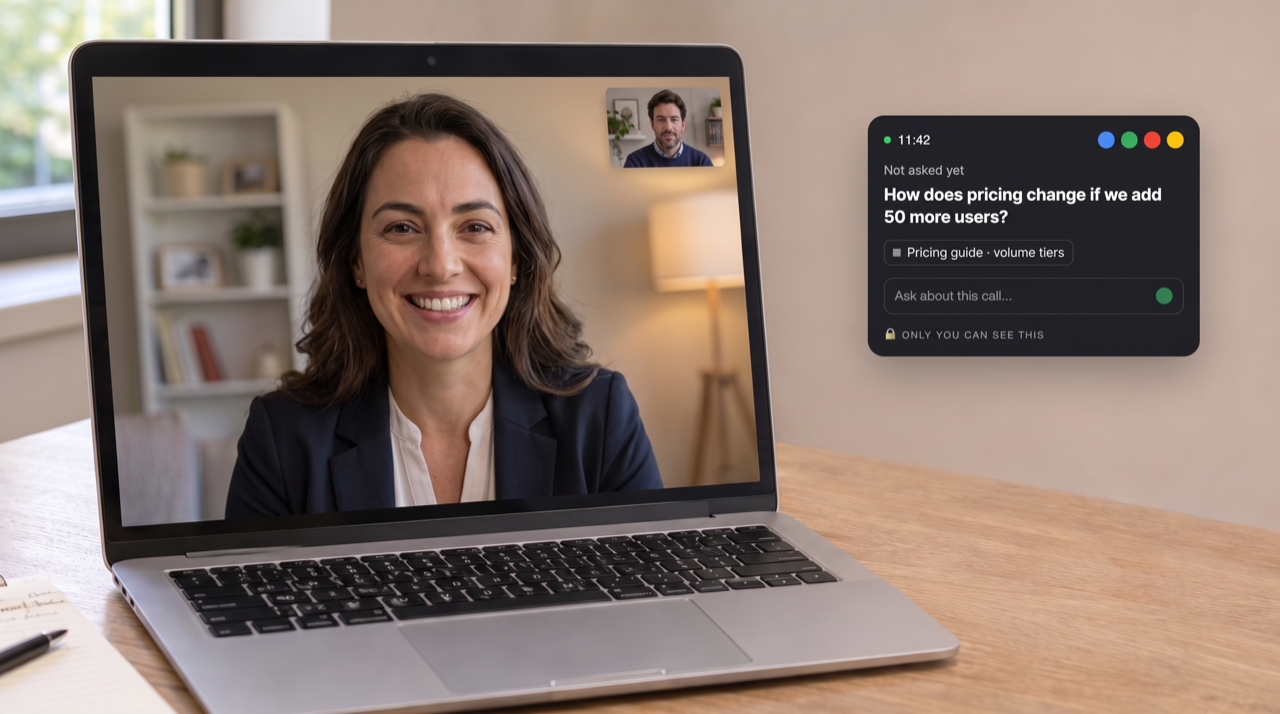
- During the call: live answers to technical, security and pricing questions, visible only to the rep. It runs alongside Zoom, Google Meet and Microsoft Teams with no bot joining the meeting.
- After the call: call and email analysis, follow-up drafts, pipeline projection and deal intelligence. It syncs with Salesforce, HubSpot and Slack, and connects to Granola and Fireflies.
Customer results: Kapital Data cut its ramp-up time by 60%, with a new joiner talking to customers after three weeks on Sunnyside. Coderland saved 50% of its ramp-up time, Covin AI used Sunnyside to ramp up its team, and MetaShot reported 5 hours a week back from prep and follow-ups (Sunnyside AI).
Pricing: free trial for 10 days or 5 calls, no card needed. Plus is $19 a month and Pro is $49 a month for one seat; Team is $89 per seat a month for up to 10 seats; Enterprise is quoted (Sunnyside pricing).
Watch out for: Sunnyside is a newer company. It is HIPAA and GDPR compliant and its SOC 2 compliance process is under way (see the Trust Center), and the mobile app is not yet released.
Consider it if: you are a founder, account executive or sales engineer selling cybersecurity, life sciences, AI, data or finance products, and you want prep, live answers, roleplay and follow-up in one self-serve tool.
Fireflies.ai (Live Assist)
Fireflies started as a meeting note-taker and now includes Live Assist, which shows real-time notes, transcripts, suggestions and AskFred answers during meetings (source: Fireflies help center). Its desktop app adds Sales Assist for knowledge-based suggestions during customer calls, and it can capture meetings without a bot (source: Fireflies help center).
Pricing: free plan; Pro is $10 and Business is $19 per seat per month billed annually (source: Fireflies help center).
Watch out for: AskFred in Live Assist uses AI credits charged per query, so heavy live use can add cost.
Consider it if: you want one meeting assistant for the whole company, sales and non-sales meetings alike.
Clari Copilot (Salesloft)
Clari Copilot (formerly Wingman) records calls and surfaces live battlecards and coaching cues during them (source: Clari). Clari and Salesloft have combined, so Copilot is now part of a larger revenue platform with Salesloft engagement and Clari forecasting.
Pricing: quoted through sales.
Watch out for: it is sold as part of an enterprise platform, and the product roadmap is still merging after the combination.
Consider it if: you already use, or plan to buy, the Salesloft and Clari platform.
How to Choose Your Call-Layer Tool: The 10-Question Test
Run one realistic mock call in each free trial and ask these questions. A tool earns a point for each answer that appears on the rep's screen during the call, is correct, and comes from a source your team approved.
- Does it integrate with our stack (for example Snowflake, Okta or Salesforce)?
- Where is our data hosted, and can we choose the region?
- Do you support SSO (SAML) and user provisioning (SCIM)?
- Is our data used to train your AI models?
- What is your SOC 2 or ISO 27001 status?
- How does pricing change as we add users or usage?
- How long does implementation take, and who owns it?
- How are you different from [your main competitor]?
- What happens to our data if we cancel?
- Can you share a customer reference in our industry?
Score 8 to 10: the tool will hold up on real technical calls. Score under 5: it will help more after the call than during it.
4. Coaching and Readiness
As teams grow, practice matters. These tools help reps rehearse before the calls that count.
Sunnyside AI Roleplay
Sunnyside includes AI roleplay as part of its prepare stage, so small teams can practice tough calls in the same tool they use on live calls. Not sure whether you need AI roleplay or a human coach? Read AI roleplay vs live sales coaching. See our AI sales roleplay guide.
Mindtickle
Mindtickle is a revenue enablement platform built to ramp reps faster, with AI roleplay, coaching, content management and readiness analytics (source: Mindtickle).
Pricing: quoted through sales.
Watch out for: it is built for large enablement programs and can be heavy for a small team.
Consider it if: an enablement team trains hundreds of reps. If you are seeing the signs your reps aren't ready for live calls, start with practice.
5. Conversation and Deal Intelligence
Once you have enough deals and calls, leaders need analytics across conversations and the pipeline: what buyers are saying, which deals are at risk, and what will close.
Sunnyside AI (Conversation and Deal Intelligence)
Sunnyside records and analyzes sales conversations and emails, and adds deal intelligence and pipeline projection on top (Sunnyside AI). Because the same tool handles prep and live calls, the insights come from the conversations your reps are already having, with no separate platform to roll out.
Pricing: included in Sunnyside plans, from $19 a month; Team is $89 per seat a month (Sunnyside pricing).
Consider it if: you want conversation and deal intelligence without an enterprise contract, or as a lighter alternative to Gong for a team under 50 reps.
Gong
Gong describes itself as a "Revenue AI OS," with AI agents and apps for engagement, forecasting and enablement (source: Gong). It is best known for deep after-call analytics, and says its platform turns customer interactions into real-time guidance (source: Gong).
Pricing: not published. Buyer-reported estimates compiled by Revenue Grid, a competitor, put the core license at about $1,300 to $1,600 per user per year, plus a platform fee of $5,000 to $50,000 a year (source: Revenue Grid).
Watch out for: cost and contract length; for teams under 20 reps it is often more than they need. See our guide to Gong alternatives for small teams.
Consider it if: you run an enterprise revenue team with RevOps support.
Clari Forecast (Salesloft)
Clari Forecast focuses on pipeline inspection and forecast accuracy. clari.com now redirects to Salesloft, which lists Clari Forecast under "Improve forecast accuracy" (source: Salesloft).
Pricing: quoted.
Consider it if: your CRO needs a forecast they can defend to the board.
Suggested Starter Stacks by Team Size
| Team | CRM | Prospecting | Calls and coaching | Deal intelligence |
|---|---|---|---|---|
| Founder-led (1–5 sellers) | HubSpot free or Starter | Apollo free plan | Sunnyside Plus or Pro | Included in Sunnyside |
| Growing team (5–20 reps) | HubSpot or Salesforce | Apollo or Clay | Sunnyside Team (roleplay included) | Sunnyside deal intelligence plus CRM reports |
| Scaling org (50+ reps) | Salesforce or HubSpot Enterprise | Clay plus a data provider | Sunnyside Enterprise, or Clari Copilot inside Salesloft | Sunnyside Enterprise, Gong or Clari Forecast |
How We Put This Guide Together
We grouped tools by the job they do in a B2B sales process and described each from its own product pages, help docs and published or buyer-reported pricing, as of November 2026. We did not run a controlled benchmark, and no vendor paid to be included. We review this guide quarterly.
Frequently Asked Questions
What AI sales tools does a B2B team need in 2027?
Most B2B teams need a CRM with built-in AI, a prospecting tool such as Apollo or Clay, and a call tool that helps reps before, during and after calls, such as Sunnyside AI. Coaching and conversation and deal intelligence become more important as the team grows; Sunnyside covers both alongside the call layer.
Which AI tools help reps during live sales calls?
Sunnyside AI, Fireflies Live Assist and Clari Copilot all show reps private, real-time help during calls, and Gong says its platform now provides real-time guidance too. Sunnyside focuses on technical and complex B2B sales, with prep, live answers, roleplay and follow-up in one self-serve tool.
Is there a cheaper alternative to Gong for small teams?
Yes. Sunnyside AI includes conversation and deal intelligence along with live call help, from $19 a month (Team at $89 per seat), without an enterprise contract. Small teams often pair it with a CRM and Apollo. Read more in our guide to Gong alternatives for small teams.
The Bottom Line
Build your 2027 sales stack one layer at a time: a CRM, a prospecting tool and a strong call tool cover most of what a B2B team needs. Sunnyside AI covers the call, coaching and conversation and deal intelligence layers in one tool. If your deals depend on answering hard technical questions on calls, start with Sunnyside AI and run the 10-question test in your first week.
Try Sunnyside free for 10 days or 5 calls, no card needed: trysunnyside.com